 V Profile AI
What Is a Digital Business Card? Complete Guide for 2026
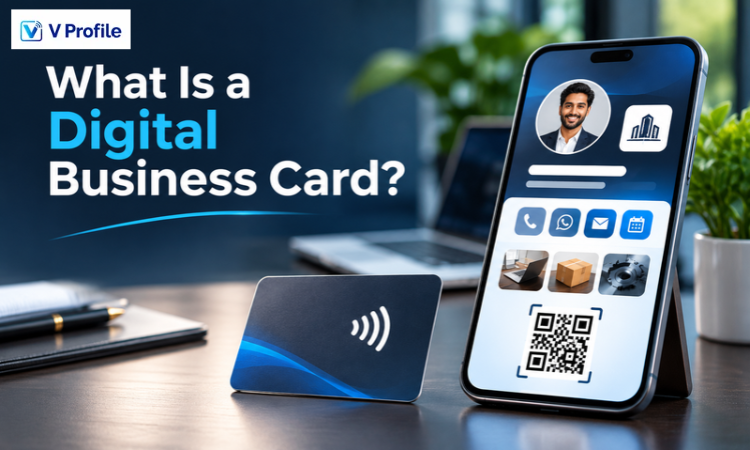
A digital business card is an online professional profile that lets people discover who you are, understand what you offer and connect with you from a phone or computer. With VProfile.ai, that idea goes beyond replacing the printed card: your profile can bring together business information, products, services, contact options and ways for visitors to start a conversation.
|
In simple terms A digital business card is a shareable online identity for a person or business. You share it through a link, QR code or compatible NFC card. Visitors open the profile, explore the information you have published and use the available contact options. With VProfile.ai, the profile can also support voice-based questions, WhatsApp communication and lead management, depending on the plan and enabled features. |
What Is a Digital Business Card?
A digital business card is an online version of the professional information traditionally printed on a visiting card. It usually starts with essentials such as a name, role, business name, phone number and email address. It can also give visitors access to a website, product catalogue, services, portfolio, social links, location, opening hours or other useful business information.
The key difference is that a digital card is not limited to a small printed surface. It is a profile that can be opened on a connected device and updated as your business changes. You can share the same profile in a face-to-face introduction, a message, an email signature or a follow-up after a meeting.
It is useful to separate three related terms:
• Digital business card: The online profile containing your professional or business information.
• QR code or NFC: Sharing methods that help someone open the profile.
• Contact saving: An option that lets a visitor save your details to their phone, where supported.
In other words, a QR code is not the profile itself. It is a quick route to the profile. The profile is the digital destination that introduces you and gives the visitor a way to connect.
How Does a Digital Business Card Work?
The process is straightforward. You create and publish a profile, then share the link or a code that opens it. The person receiving it can view the details on their device and choose what to do next.
1. Set up your identity: Add your name or business name, professional category, contact information and the details visitors need to understand your work.
2. Build the profile: Organise your introduction, services, products, images and relevant business information in one page.
3. Publish and share: Use your profile link or QR code. A compatible NFC card or tag can provide a tap-to-open option.
4. Let visitors connect: Depending on the options you enable, visitors may call, message, save your contact, submit an enquiry or explore your offerings.
5. Manage the next interaction: Where the relevant VProfile.ai plan features are enabled, enquiries and exchanged contacts can be managed through its contacts and CRM tools.
A hosted profile is especially useful when information changes. You can update the online page rather than reprinting a new batch of cards. However, a contact that someone has already saved to their phone is a separate copy; updating your profile does not necessarily change that saved record.
What Makes the VProfile.ai Approach Different?
VProfile.ai describes its product as a digital business profile that can do more than display contact details. The central idea is to connect the profile, the conversation and the follow-up process. A visitor can discover your business through one link, a QR scan or a compatible NFC tap, while the tools available to you depend on your selected plan.
1. One profile that introduces your business
Your VProfile.ai profile can bring together your business introduction, contact options, products, services, images and other published information. This gives a prospective customer a more complete view than a name-and-number card. It can be especially useful for businesses where visitors want to check services, products, business hours or examples of previous work before reaching out.
2. Link, QR and NFC sharing
You can share a profile link online or use its QR code in person. VProfile.ai also presents NFC cards as a tap-to-open option. The NFC card or tag is a physical sharing accessory; the digital profile is the page that opens. Device compatibility and the availability of physical NFC products should be checked for your chosen setup.
3. A profile that can answer questions by voice
VProfile.ai's website describes a voice assistant that allows a visitor to ask questions from the profile. The assistant is designed to respond using the information published in your profile, such as your services, prices, business hours or policies. This makes it important to keep your profile information accurate and current. Voice AI availability and usage limits depend on the plan.
4. Two-way contact exchange with Smart Connect
Networking is not only about sharing your own details. VProfile.ai's Smart Connect flow is designed to read contact information from a paper business card, badge or screen using OCR. The contact can then be saved to your V Profile contacts and CRM, while your own details can be sent to the new connection through WhatsApp. The flow also describes adding a voice note or photo to help you remember the conversation.
5. Lead handling and CRM tools
For businesses that receive enquiries regularly, the next step after sharing a card is often the most important one. VProfile.ai describes lead inbox and CRM capabilities, including lead scoring and suggested follow-up actions on applicable plans. This connects a networking interaction to a practical follow-up workflow instead of leaving the new contact in a pile of unorganised numbers.
|
Important plan note Not every feature is included in every plan. The current VProfile.ai website describes a Free plan with one digital profile, a personal link and QR code, contact-saving and communication buttons, profile content limits, an enquiry inbox and limited paper-card scanning. Higher plans add more AI, WhatsApp, CRM, automation and team capabilities. Review the live plan details on the VProfile.ai website before choosing a plan. |
How Can You Share Your VProfile.ai Profile?
Share the direct profile link
A direct link is useful for WhatsApp conversations, email, proposals, social profiles and online meetings. It is easy to copy and send when you are networking remotely or following up after an introduction.
Display the QR code
Show your QR code on your phone, a presentation, a counter display, an event badge or other business material. A visitor scans it to open your profile. For in-person use, make sure the code is large enough to scan and that the destination is correct.
Use an NFC card or tag
An NFC-enabled card or tag can make sharing feel as simple as a tap. The receiving phone must support the relevant NFC reading behaviour. Keep your QR code or direct profile link available as a backup for devices or situations where NFC is not convenient.
Add the profile to everyday business communication
Your profile link can also be used in an email signature, a WhatsApp business conversation, a digital proposal or a post-meeting message. Using one consistent destination helps people find the same current business information wherever they meet you.
What Can Your Digital Business Profile Include?
The right content depends on whether the profile represents an individual, a local business or a team. Start with the essentials and add information that answers the questions your customers usually ask.
• Identity: Name, professional role, business name, logo and a clear introduction.
• Contact options: Phone, email, WhatsApp and contact-saving options.
• Products and services: A concise list of what you offer, with useful descriptions and images.
• Business information: Opening hours, address, service area, payment details and other practical information where relevant.
• Visual proof: Gallery images, portfolio examples, videos or project highlights that help visitors understand your work.
• Trust signals: Published reviews, testimonials, frequently asked questions or other relevant proof points.
• Next step: A clear way to call, message, enquire, request an appointment or explore your business further.
Do not treat the profile as a place to publish everything you have. Prioritise what a new customer needs to know first. A focused profile is easier to scan and makes the next step more obvious.
Benefits of a Digital Business Card for Professionals and Businesses
Keep important business information together
Rather than sharing a phone number in one message, a portfolio in another and a service list somewhere else, a digital profile can bring those details together in one destination.
Make changes without reprinting
When you update a hosted profile, future visitors who use the same link can see the revised information. This is useful when your business hours, services, role or contact details change.
Support more kinds of networking
A profile link can be shared remotely, while a QR code or NFC card can be used during an in-person introduction. You can use the same professional identity in different settings.
Show more than your name and number
Customers may want to see products, services, examples of work, opening hours or answers to common questions before contacting you. A well-organised profile gives them more context at the point of introduction.
Help organise follow-up
For businesses using the relevant VProfile.ai lead and CRM features, a connection can become part of a follow-up process. Contact capture, lead details and suggested next actions can help reduce the chance that a promising enquiry is forgotten.
Reduce dependence on printed card stock
Sharing a profile digitally can reduce how often you need to print replacement cards. It does not mean paper cards are never useful; it gives you another way to share information when a physical card is not necessary.
Who Should Use a Digital Business Card?
• Freelancers and consultants: Share professional details, services and work samples with potential clients.
• Shops, salons and restaurants: Give customers a way to explore products, services, opening hours and contact options from a QR code.
• Clinics and service professionals: Present relevant services, hours and contact details so visitors can understand how to reach the business.
• Sales and marketing teams: Exchange details at events and organise enquiries for follow-up.
• Agencies and creative businesses: Share a profile that introduces the team and showcases work.
• Growing organisations: Maintain a more consistent way for employees to introduce the business, subject to the team's plan and access requirements.
VProfile.ai also has a public directory where visitors can browse listed profiles by industry and location. Directory visibility depends on the profile being public and listed.
Digital Business Card vs Paper Business Card
Both formats can help you make a professional introduction. The right option depends on the setting and how you prefer to share information. A digital profile can also work alongside printed cards rather than replacing them completely.
|
Consideration |
Digital business card |
Paper business card |
|
Sharing |
Link, QR code or compatible NFC tap |
Physical handover |
|
Information |
Can present contact details, services, products and online content |
Limited by the printed space |
|
Updating |
Hosted profile can be edited for future visitors |
Usually requires a new print run |
|
Recipient action |
Can open links, use contact options or save details |
Recipient typically enters details manually |
|
Connectivity |
Opening a hosted profile normally requires internet access |
Printed details can be read without internet |
|
Best use |
Ongoing digital identity and shareable business information |
Physical introductions and offline situations |
Paper cards can still be useful when a physical handover matters or connectivity is limited. A digital business card is useful when you want to provide an online profile that can be updated and accessed through a link, QR code or compatible NFC method.
For another perspective on digital visiting cards, explore VProfile.ai's guide to smarter networking with an electronic visiting card.
How to Get Started with VProfile.ai
You do not need to begin with a complicated profile. Start with the information people need to recognise your business and contact you, then add more detail as your requirements grow.
1. Choose the profile type: Decide whether you are creating a profile for an individual, a local business or an organisation.
2. Prepare your core information: Have your business name, category, contact details, short introduction and important links ready.
3. Start the VProfile.ai setup: Visit VProfile.ai and use the profile creation option. The website describes an onboarding flow that can begin with a description of your business or links to information you already have online.
4. Review the profile carefully: Check names, numbers, opening hours, services, images and all details visitors may rely on. Correct anything that is missing or inaccurate before sharing the profile.
5. Choose how to share it: Use the profile link and QR code. Consider NFC where it suits your business and devices.
6. Explore additional tools when you need them: Review the available plans if you need expanded AI usage, WhatsApp messaging, CRM workflows or team access.
For a related walkthrough, read VProfile.ai's guide on how to create a free virtual business card. You can also explore seven ways to use an e-business card in 2026 for ideas on using your profile beyond a simple introduction.
Privacy and Responsible Sharing
A digital business card makes selected information easier to access, so think carefully about what you publish. Use business contact details where possible and avoid placing private personal information on a public profile. Only include an address, direct number or other detail when you are comfortable making it available to the people who can view the page.
Review the privacy settings and account protections available in your VProfile.ai account. Keep your profile information accurate, remove details that are no longer relevant and make sure any team members who can edit a shared business profile understand what should be public.
It is also sensible to check a QR code or NFC destination before printing or distributing it. A visitor should be able to recognise that the code opens your intended VProfile.ai profile.
Give your business one profile to shareBring your introduction, business information and contact options together in a VProfile.ai profile. Start with the essentials, share your link or QR code and explore additional tools as your networking needs grow. |
Key Takeaways
• A digital business card is an online professional profile, not simply a picture of a printed card.
• A link, QR code or compatible NFC card can help people open the profile.
• A VProfile.ai profile can bring together business information, contact options, products, services and visual content.
• VProfile.ai also describes Voice AI, Smart Connect, WhatsApp communication and CRM capabilities, with availability depending on the plan.
• Keep your profile accurate, focused and appropriate for public sharing.
• Choose a plan based on the features and limits your individual or business workflow actually needs.
Conclusion
A digital business card gives professionals and businesses a practical way to share more than a name and phone number. It can introduce your work, present useful business information and make it easier for someone to take the next step after meeting you.
VProfile.ai builds on this idea by connecting a shareable digital profile with tools for voice-based questions, two-way contact exchange, WhatsApp communication and lead management on applicable plans. Whether you are an independent professional, a local business or part of a growing team, the best starting point is a clear profile with accurate information and an easy way for visitors to connect.
Explore VProfile.ai to create a digital business profile and make your next professional introduction easier to follow up.
Related articles
View all →How to Create a Free Digital Business Card in 5 Minutes
Creating a digital business card does not require design software or printing. With VProfile.ai, you can build a professional prof...
Digital Business Card vs Paper Business Card: What Is the Difference?
Digital networking has changed how people exchange contact details, but paper business cards have not disappeared. Each format sol...
7 Innovative Ways to Use an E Business Card in 2026
7 Innovative Ways to Use an E Business Card in 2026 Introduction: The World of Networking Has Evolved — Have You? Let’s be honest....